
如何给Typecho的Feed订阅中增加指定文章评论
## 实现目的
在博客 Feed 订阅源页面中,输出指定文章(如:说说/时光机等)下的评论 Feed 内容,让小伙伴在订阅博客 Feed 时,既能读取博主的文章,也能看到博主的(说说/时光机等)心情动态。
转载来源
感谢老哥:Lopwon,相关文章:给博客 Feed 添加指定文章评论 Feed
注意:此文档源于作者在博客改造中的一些经验总结,转载还请署名。
工作原理
Typecho 有博客 Feed 显示博客最新 10 篇文章,另外,还有文章 Feed 展示文章内容和该文章下的评论信息,而部分博客的(说说/时光机)功能,刚好是使用文章下的评论作为心情动态的提交发布。本文档即是把指定文章下的评论信息,整合到博客 Feed 页面中。
修改方法
敬告:此文档操作涉及程序核心文件的修改,作者不对你在使用中产生的任何问题造成的不良后果,承担责任。
打开文件 var/Widget/Archive.php 搜索找到第 1477 行,将 else {…} 里的代码全部替换为以下代码(留意注释,以及按需修改):
/**
 * 文章
 */

<!--INLINEMATH0-->this->options->title . (<!--INLINEMATH1-->this->archiveTitle : null));

$postArr = [];

while ($this->next()) {
    <!--INLINEMATH2-->plugged)->feedItem(<!--INLINEMATH3-->this);
    if (!$plugged) {
        $suffix = null;
    }

    $feedUrl = '';
    if (Feed::RSS2 == $this->feedType) {
        <!--INLINEMATH4-->this->feedUrl;
    } elseif (Feed::RSS1 == $this->feedType) {
        <!--INLINEMATH5-->this->feedRssUrl;
    } elseif (Feed::ATOM1 == $this->feedType) {
        <!--INLINEMATH6-->this->feedAtomUrl;
    }

    $postArr[] = [
        'title'           => $this->title,
        'content'         => <!--INLINEMATH7-->this->content
            : (false !== strpos(<!--INLINEMATH8-->this->excerpt .
                "<p class=\"more\"><a href=\"{<!--INLINEMATH9-->this->title}\">[...]</a></p>"
                : $this->content),
        'date'            => $this->created,
        'link'            => $this->permalink,
        'author'          => $this->author,
        'excerpt'         => $this->___description(),
        'comments'        => $this->commentsNum,
        'commentsFeedUrl' => $feedUrl,
        'suffix'          => $suffix
    ];

}

$postItemArr = [];

foreach (<!--INLINEMATH10-->postItem) {
    <!--INLINEMATH11-->postItem;
}

/**
* 评论
*/

$comments = Recent::alloc('pageSize=5&parentId=2'); // pageSize=5 为输出评论的数量;parentId=2 为指定文章的 cid

$commentArr = [];

while ($comments->next()) {
    <!--INLINEMATH12-->plugged)->commentFeedItem(<!--INLINEMATH13-->comments);
    if (!$plugged) {
        $suffix = null;
    }

    $commentArr[] = [
        'title'   => 'title'   => strlen(strip_tags(<!--INLINEMATH14-->comments->content) : '图片说说,点击查看',// 如果评论(说说)中只有图片或表情图标,没有文字时,输出自定义提示内容
        'content' => $comments->content,
        'date'    => $comments->created,
        'link'    => $comments->permalink,
        'author'  => (object)[
            'screenName' => $comments->author,
            'url'        => $comments->url,
            'mail'       => $comments->mail
        ],
        'excerpt' => strlen(strip_tags(<!--INLINEMATH15-->comments->content) : '图片说说',
        'suffix'  => $suffix
    ];
}

$commentItemArr = [];

foreach (<!--INLINEMATH16-->commentItem) {
    <!--INLINEMATH17-->commentItem;
}

/**
* 合并排序
*/

<!--INLINEMATH18-->postItemArr, $commentItemArr);

usort(<!--INLINEMATH19-->a, $b) {
    return <!--INLINEMATH20-->a['date'];
});

foreach (<!--INLINEMATH21-->mood) {
    <!--INLINEMATH22-->mood);
}
注意:请将以上代码中,有注释行的参数修改为自己需要的,作用是:将指定页面、指定数量的评论输出到博客 Feed 中,该数量不受博客 Feed 默认的 10 篇影响,也就是博客 Feed 输出的数量将变更为(10 + 评论数量),如果需要修改博客 Feed 默认的 10 篇数量,请修改第 276 行的 pageSize=10 数量。
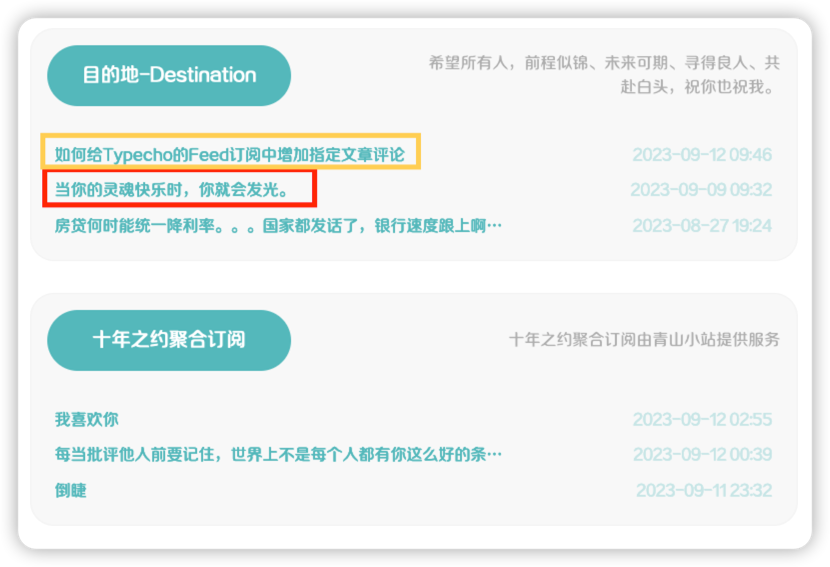
至此,访问博客 Feed 地址后,就能看到输出的指定文章下的评论信息了,并且,文章和评论(说说)按照发布时间混合排序。
效果展示
展示页面:友链
11 个赞


 哈哈哈
哈哈哈
